How to Write Your VIP Page With ChatGPT, Step by Step

To write your VIP page with ChatGPT, press Copy AI prompt in your VIP tab and paste it into ChatGPT. Replace the placeholders with your real details and send it. ChatGPT replies with one HTML file. Paste that into the Page HTML box, press Preview page and check every fact before you submit.
You do not need to code. The prompt does the hard part. Your job is to give it true facts and to read what comes back. If you are new to VIP pages, start with what a VIP page is.
What do you need before you start?
- A Listings Biz account and a free 24-hour preview or a VIP licence key. You can start in your account. If you have no listing yet, see how to add your business to an online directory.
- Your real facts: what you do, your services, your address or the area you cover, your opening hours and your prices.
- A contact email. It is required.
- A logo and a small square favicon. Both are required. A hero image is optional. Use JPG, PNG, WEBP or GIF, up to 2 MB each. See Logo, favicon and hero image.
How do you write your VIP page with ChatGPT?
Step 1: Choose your page type and name
In the VIP tab, pick Personal or Business, then your category, page name and website (the website is optional). Step 2: type, category and website explains each field.
Step 2: Press Copy AI prompt
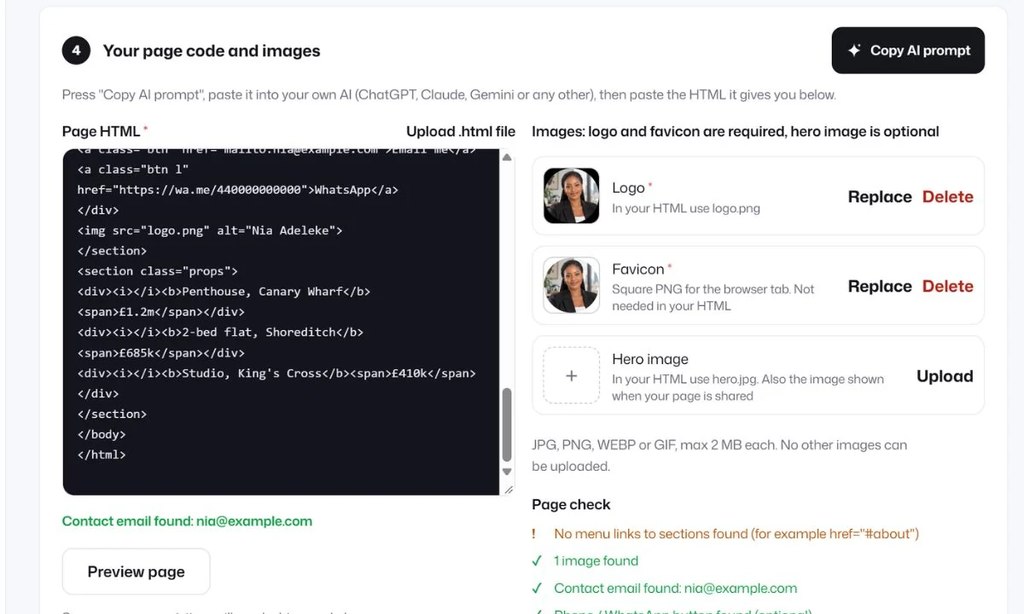
In step 4, Your page code and images, press Copy AI prompt. The button changes to Copied. The prompt is already filled in with your page type, name, category, website and email.
Step 3: Paste the prompt into ChatGPT
Open ChatGPT in a new tab, paste the prompt into a new chat and keep it open.
Step 4: Replace the placeholders
The prompt has placeholders in square brackets, such as [WRITE ONE OR TWO SENTENCES ABOUT WHAT YOU DO]. Replace each one with your own text. Check that the contact email is right. Use real facts only. If you do not have a fact, delete that line instead of letting the AI invent one.
Step 5: Send it and copy the HTML
Send the message. ChatGPT replies with one complete HTML file. Copy all of it, from the first line to the last.
Step 6: Paste the HTML into the form
Paste the HTML into the Page HTML box in the VIP tab. You can also save it as a .html file and press Upload .html file.
Step 7: Press Preview page
Press Preview page to see what visitors will see. Then read the page check next to the box. See Preview and page check.
The full walkthrough is in our guide to writing your page with AI.
What does the prompt include?
- The kind of page (personal or business) and your name
- Your category and the sections to write, in order
- Your website, as a reference only
- Your contact email, as a required email button
- A request for the SEO text: a title of up to 60 characters and a meta description of up to 155 characters, which fill in step 5 for you
- The image names to use: logo.png and hero.jpg
- Our rules, so the page can be published
What does ChatGPT get wrong?
ChatGPT writes clean pages and it also invents details. Read every line against the facts you know. Delete anything you cannot prove.
| What to check | What can go wrong | How to check it |
|---|---|---|
| Opening hours | Hours you never gave | Compare with your door sign or Google profile |
| Years in business, awards, client counts | Numbers that sound good but are made up | Delete any you cannot prove |
| Prices | Prices that are not yours | Compare with your price list |
| Phone, WhatsApp and email | Wrong numbers, broken buttons | Tap each one on your own phone |
| Address and service area | A different city or street | Read it against your listing |
| Claims such as best or number one | Claims you cannot back up | Replace with a plain fact |
How do you ask ChatGPT to improve the page?
After the first result you can ask for changes. Try “make the colours calmer”, “shorten the about section” or “add a services list”. Every time, ask for the complete HTML file. A partial snippet will break the page when you paste it in.
What does the page check tell you?
The page check reads your HTML and tells you what it found. A good result looks like this: contact email found, an image found and a phone or WhatsApp button found. It also warns you about problems, for example menu links that point to sections that do not exist, such as href=”#about”.
Fix each warning, then paste the new HTML and check again. If you do not know how to fix one, copy the warning into ChatGPT and ask it to fix the page. Remind it to return the complete HTML file.
What if something goes wrong?
| Problem | What to do |
|---|---|
| ChatGPT cuts the HTML off before the end | Ask for the complete HTML file again, or type “continue” and join the parts |
| The page has a form or scripts | Scripts and forms are removed. Ask for an email, phone or WhatsApp button instead |
| The AI used image links from other websites | Ask it to use logo.png and hero.jpg, and upload your own images |
| The page has a menu with # links | Ask it to remove the menu links to sections |
Only HTML and CSS are kept on a VIP page. The page HTML rules list what is kept and what is removed.
What happens after you submit your page?
Our team reviews every page and every change before it goes live. VIP pages are reviewed first, with a target of 10 hours. That is a target, not a promise. When the page is approved it goes live on your listing address. After that, VIP includes unlimited edits, and each edit is checked before it is published.
Can you use Claude or Gemini instead?
Yes. The prompt works in ChatGPT, Claude, Gemini or any other AI tool. The steps are the same: paste the prompt, replace the placeholders, copy the HTML, paste it in the form and check the preview.
Can you try it before you pay?
Yes. A free 24-hour preview gives you a private link to your page with no card. Links to other websites are switched off in a preview, while email, phone and WhatsApp buttons work. After 24 hours the page waits 24 hours as a draft, then it is deleted unless you add a licence key. Read Try your VIP page free for 24 hours. VIP costs $2 a month or $12 a year. See the Pricing page.
Frequently asked questions
Do I need to know how to code?
No. Press Copy AI prompt, paste it into ChatGPT, replace the placeholders and paste the HTML it writes back into the form.
Can I use Claude or Gemini instead of ChatGPT?
Yes. The prompt works in any AI tool. The steps are the same.
What if ChatGPT writes something that is not true?
Read every line and delete anything you cannot prove. Our team checks pages for safety and a working contact email, but you are responsible for what the page says.
Can I change the page after it goes live?
Yes. VIP includes unlimited edits. Ask ChatGPT for the complete HTML file each time, paste it in and send it for review.
How much does a VIP page cost?
VIP is $2 a month or $12 a year. You can try a free 24-hour preview first.
Write your page with true facts, read the preview on your phone and fix every warning. Then send it for review. You can start a free preview today.